Soong CLI
Effortless GPU instance management for Lambda Labs
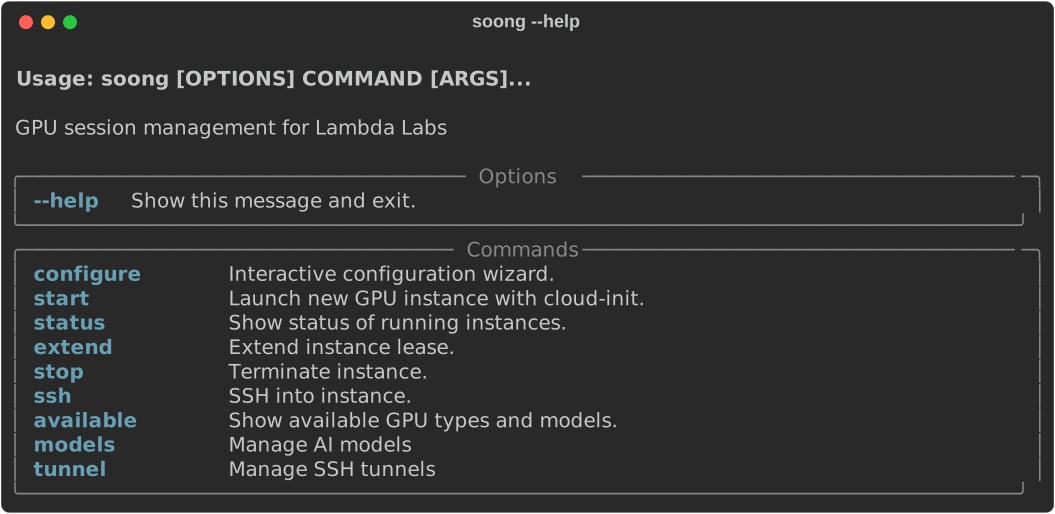
Soong is a powerful command-line tool that simplifies managing Lambda Labs GPU instances. Launch, monitor, and connect to GPU instances with a single command—no manual configuration required.
Key Features
🚀 One-Command Instance Management
Launch GPU instances with your preferred model and instance type in seconds. No need to navigate web consoles or remember complex API calls.
🔒 Automated SSH Tunneling
Securely access your services through automatically configured SSH tunnels:
- Port 8000: SGLang inference server
- Port 5678: n8n workflow automation
- Port 8080: Instance status daemon
💰 Built-in Cost Controls
Set maximum runtime limits to prevent unexpected charges. Your instance automatically stops when the time limit is reached.
🤖 Smart Model Selection
Browse available models and get instant recommendations for the right GPU instance type based on VRAM requirements.
📊 Real-time Monitoring
Check instance status, uptime, and cost at any time:
soong status
# Instance: i-abc123def456 (gpu_1x_h100_pcie)
# Status: running
# Uptime: 1h 23m
# Cost: $2.46
Quick Example
# Configure your Lambda Labs credentials (one-time setup)
soong configure

# Start an instance with DeepSeek-R1
soong start --model deepseek-ai/DeepSeek-R1

# SSH into your instance
soong ssh

# Check status and cost
soong status

# Stop the instance when done
soong stop
What's Next?
Ready to get started? Follow our step-by-step guide:
-
Set up your Lambda Labs account, install the CLI, and launch your first GPU instance in 5 minutes.
-
Detailed explanation of all configuration options and advanced settings.
-
Complete documentation for every CLI command with examples.
-
System design, cost controls, and how everything works together.
Why Soong CLI?
Traditional GPU instance management involves:
- Navigating multiple web consoles
- Manually configuring SSH keys and tunnels
- Tracking instance costs in spreadsheets
- Remembering which instance types support which models
Soong CLI eliminates all of this. Configure once, then launch and manage instances with simple commands. Focus on your work, not infrastructure management.
System Requirements
- Python: 3.10 or later
- Operating System: Linux, macOS, or Windows (with WSL)
- Lambda Labs Account: Sign up here
Community & Support
- GitHub: Report issues or contribute
- Documentation: You're here!
- Lambda Labs: Official documentation
New to Lambda Labs?
Check out our Prerequisites Guide for step-by-step instructions on setting up your Lambda Labs account.