CLI Commands Reference
Complete reference for all soong commands, flags, and options.
Global Options
All commands support these global options:
| Flag | Description |
|---|---|
--help |
Show help message and exit |
Core Commands
configure
Interactive configuration wizard to set up Lambda Labs credentials and defaults.
What it does:
- Prompts for Lambda API key (validates it)
- Generates or accepts status daemon token
- Helps select default model (shows VRAM requirements)
- Helps select default GPU type (shows pricing and availability)
- Selects default region
- Sets persistent filesystem name
- Sets default lease duration (with cost estimates)
- Configures SSH key path
No flags or options - fully interactive.
Example:
$ soong configure
╭─────────────────────────────────────────────╮
│ Soong Configuration Wizard           │
│                                             │
│ This will guide you through setting up     │
│ your Lambda Labs credentials and defaults. │
╰─────────────────────────────────────────────╯

Lambda API key: sk_****************************
✓ API key valid.

Default model: DeepSeek-R1 70B (70B INT4) - needs 40GB+ VRAM
GPU type: 1x A100 SXM4 (80 GB) - $1.29/hr (available) ⟵ RECOMMENDED
Default region: us-west-1
Filesystem name: coding-stack
Default lease duration: 4 hours ($5.16)
SSH private key path: ~/.ssh/id_rsa

Configuration saved!
start
Launch a new GPU instance with specified model and configuration.
Options:
| Flag | Type | Default | Description |
|---|---|---|---|
--model TEXT |
String | Config default | Model to load (overrides default) |
--gpu TEXT |
String | Config default | GPU type (overrides default) |
--region TEXT |
String | Config default | Region (overrides default) |
--hours INTEGER |
Integer | Config default | Lease duration in hours |
--name TEXT |
String | None | Custom instance name |
--wait / --no-wait |
Boolean | True | Wait for instance to be ready |
-y, --yes |
Boolean | False | Skip cost confirmation |
Examples:
# Start with defaults
soong start

# Start with specific model
soong start --model qwen2.5-coder-32b

# Start with custom GPU and skip confirmation
soong start --gpu gpu_1x_h100_pcie --yes

# Start with all custom options
soong start \
  --model deepseek-r1-70b \
  --gpu gpu_1x_a100_sxm4_80gb \
  --region us-east-1 \
  --hours 6 \
  --name my-coding-session

# Quick start without waiting
soong start --no-wait
Output:
Preparing to launch instance...
  Model: deepseek-r1-70b
  GPU: gpu_1x_a100_sxm4_80gb
  Region: us-west-1
  Lease: 4 hours

╭─────────────────────────────╮
│ Launch Instance             │
│                             │
│ GPU: 1x A100 SXM4 (80 GB)  │
│ Rate: $1.29/hr              │
│ Duration: 4 hours           │
│                             │
│ Estimated cost: $5.16       │
╰─────────────────────────────╮

? Proceed with launch? Yes

Launching instance...
Instance launched: i-abc123def456
Instance ready at 203.0.113.42

SSH: soong ssh
Status: soong status
status
Show status of running instances with uptime, cost, and lease information.
Options:
| Flag | Type | Default | Description |
|---|---|---|---|
--instance-id TEXT |
String | Active instance | Specific instance ID to check |
-h, --history |
Boolean | False | Show termination history |
-s, --stopped |
Boolean | False | Show stopped instances |
--history-hours INTEGER |
Integer | 24 | Hours of history to show |
--worker-url TEXT |
String | None | Cloudflare Worker URL for remote history |
Examples:
# Show running instances
soong status

# Show specific instance
soong status --instance-id i-abc123

# Show termination history (last 24 hours)
soong status --history

# Show last 48 hours of history
soong status --history --history-hours 48

# Show stopped instances
soong status --stopped

# Sync history from Cloudflare Worker
soong status --history --worker-url https://worker.example.com
Output:
GPU Instances
┏━━━━━━━━┳━━━━━━━━┳━━━━━━━━┳━━━━━━━━━━━━━┳━━━━━━━━━━━━━━━━┳━━━━━━━━┳━━━━━━━━━━┳━━━━━━━━━━┳━━━━━━━━━━━┓
┃ ID     ┃ Name   ┃ Status ┃ IP          ┃ GPU            ┃ Uptime ┃ Time Left┃ Cost Now ┃ Est.Total┃
┡━━━━━━━━╇━━━━━━━━╇━━━━━━━━╇━━━━━━━━━━━━━╇━━━━━━━━━━━━━━━━╇━━━━━━━━╇━━━━━━━━━━╇━━━━━━━━━━╇━━━━━━━━━━┩
│ abc123 │ coding │ active │ 203.0.113.42│ gpu_1x_a100... │ 2h 15m │ 1h 45m   │ $2.91    │ $5.16    │
└────────┴────────┴────────┴─────────────┴────────────────┴────────┴──────────┴──────────┴──────────┘
extend
Extend the lease duration of a running instance.
Arguments:
| Argument | Type | Required | Description |
|---|---|---|---|
HOURS |
Integer | Yes | Hours to extend lease by |
Options:
| Flag | Type | Default | Description |
|---|---|---|---|
--instance-id TEXT |
String | Active instance | Instance to extend |
-y, --yes |
Boolean | False | Skip cost confirmation |
Examples:
# Extend active instance by 2 hours
soong extend 2

# Extend specific instance
soong extend 3 --instance-id i-abc123

# Quick extend without confirmation
soong extend 1 --yes
Output:
╭─────────────────────────────╮
│ Extend Lease                │
│                             │
│ Instance: abc123            │
│ GPU: 1x A100 SXM4 (80 GB)  │
│ Rate: $1.29/hr              │
│ Extension: 2 hours          │
│                             │
│ Additional cost: $2.58      │
╰─────────────────────────────╮

? Extend lease by 2 hours? Yes

Lease extended by 2 hours
New shutdown time: 2025-01-01T18:30:00Z
stop
Terminate a running instance.
Options:
| Flag | Type | Default | Description |
|---|---|---|---|
--instance-id TEXT |
String | Active instance | Instance to terminate |
-y, --yes |
Boolean | False | Skip confirmation |
Examples:
# Stop active instance (with confirmation)
soong stop

# Stop specific instance
soong stop --instance-id i-abc123

# Force stop without confirmation
soong stop --yes
ssh
SSH into a running instance.
Options:
| Flag | Type | Default | Description |
|---|---|---|---|
--instance-id TEXT |
String | Active instance | Instance to connect to |
Examples:
Notes:
- Uses SSH key path from configuration
- Connects as
ubuntuuser - Opens interactive SSH session
available
Show available GPU types and their current capacity.
No options - displays all GPU types with availability.
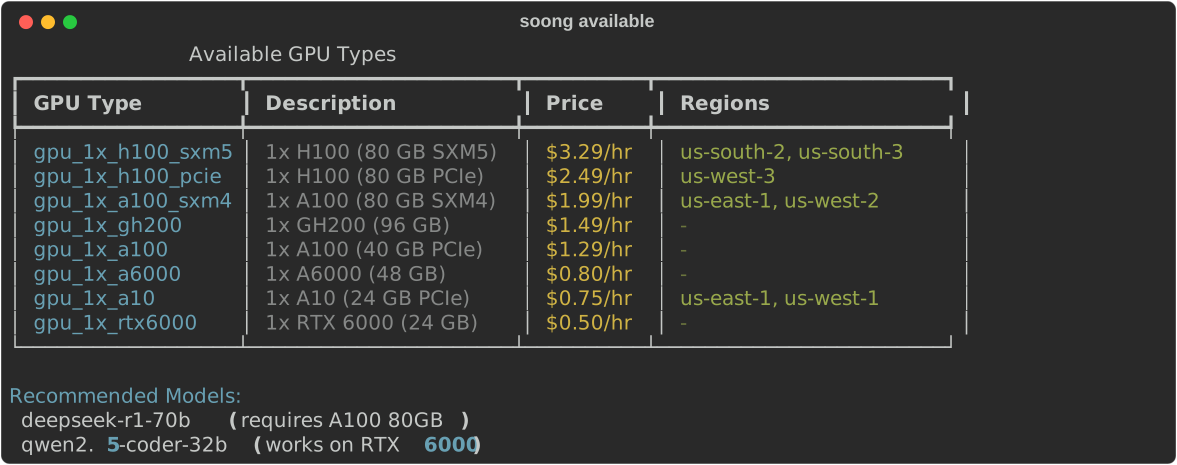
Output:
Available GPU Types
┏━━━━━━━━━━━━━━━━━━━━━━━┳━━━━━━━━━━━━━━━━━━━┳━━━━━━━━━━━┓
┃ GPU Type              ┃ Regions           ┃ Available ┃
┡━━━━━━━━━━━━━━━━━━━━━━━╇━━━━━━━━━━━━━━━━━━━╇━━━━━━━━━━━┩
│ gpu_1x_a100_sxm4_80gb │ us-west-1, us-... │ Yes       │
│ gpu_1x_h100_pcie      │ us-east-1         │ Yes       │
│ gpu_1x_a6000          │ -                 │ No        │
└───────────────────────┴───────────────────┴───────────┘

Recommended Models:
  deepseek-r1-70b (requires A100 80GB)
  qwen2.5-coder-32b (works on RTX 6000)
Models Subcommand
Commands for managing AI models.
models (list)
List all available models with VRAM requirements.
Output:
Available Models
┏━━━━━━━━━━━━━━━━━━━━━┳━━━━━━━━┳━━━━━━━┳━━━━━━━┳━━━━━━━━━━━━━━━━━━━━┓
┃ ID                  ┃ Params ┃ Quant ┃ VRAM  ┃ Min GPU            ┃
┡━━━━━━━━━━━━━━━━━━━━━╇━━━━━━━━╇━━━━━━━╇━━━━━━━╇━━━━━━━━━━━━━━━━━━━━┩
│ llama-3.1-8b        │    8B  │  FP16 │ 18GB  │ 1x A10 (24 GB)     │
│ mistral-7b          │    7B  │  FP16 │ 20GB  │ 1x A10 (24 GB)     │
│ qwen2.5-coder-32b-..│   32B  │  INT4 │ 22GB  │ 1x A10 (24 GB)     │
│ codellama-34b       │   34B  │  FP16 │ 73GB  │ 1x A100 SXM4 (80..)│
│ qwen2.5-coder-32b   │   32B  │  FP16 │ 69GB  │ 1x A100 SXM4 (80..)│
│ deepseek-r1-70b     │   70B  │  INT4 │ 44GB  │ 1x A100 SXM4 (80..)│
│ llama-3.1-70b       │   70B  │  INT4 │ 44GB  │ 1x A100 SXM4 (80..)│
└─────────────────────┴────────┴───────┴───────┴────────────────────┘

Custom models: 0 configured
models info
Display detailed information about a specific model.
Arguments:
| Argument | Type | Required | Description |
|---|---|---|---|
MODEL_ID |
String | Yes | Model ID to display info for |
Examples:
# Show DeepSeek-R1 details
soong models info deepseek-r1-70b

# Show Qwen2.5 Coder details
soong models info qwen2.5-coder-32b
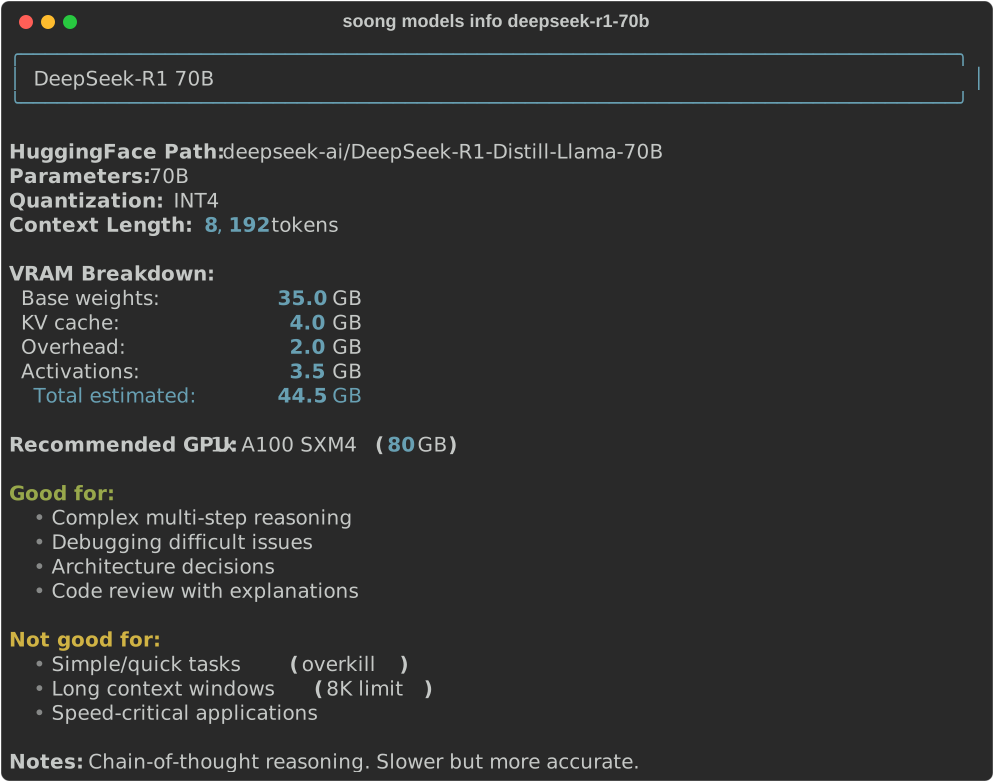
Output:
╭─────────────────────────────╮
│ DeepSeek-R1 70B             │
╰─────────────────────────────╯

HuggingFace Path: deepseek-ai/DeepSeek-R1-Distill-Llama-70B
Parameters: 70B
Quantization: INT4
Context Length: 8,192 tokens

VRAM Breakdown:
  Base weights:       35.0 GB
  KV cache:            4.0 GB
  Overhead:            2.0 GB
  Activations:         3.5 GB
  Total estimated:    44.5 GB

Recommended GPU: 1x A100 SXM4 (80 GB)
  Price: $1.29/hr

Good for:
  • Complex multi-step reasoning
  • Debugging difficult issues
  • Architecture decisions
  • Code review with explanations

Not good for:
  • Simple/quick tasks (overkill)
  • Long context windows (8K limit)
  • Speed-critical applications

Notes: Chain-of-thought reasoning. Slower but more accurate.
models add
Add a custom model to configuration.
Interactive Mode (no flags):
Prompts for: name, HuggingFace path, parameters, quantization, context length.
Flag Mode (all required):
| Flag | Type | Required | Description |
|---|---|---|---|
--name TEXT |
String | Yes | Model name/ID |
--hf-path TEXT |
String | Yes | HuggingFace model path |
--params FLOAT |
Float | Yes | Parameter count in billions |
--quantization TEXT |
String | Yes | fp32, fp16, int8, or int4 |
--context INTEGER |
Integer | Yes | Context length in tokens |
Examples:
# Interactive mode
soong models add

# Flag mode
soong models add \
  --name my-custom-70b \
  --hf-path myorg/custom-model-70b \
  --params 70 \
  --quantization int4 \
  --context 8192
models remove
Remove a custom model from configuration.
Arguments:
| Argument | Type | Required | Description |
|---|---|---|---|
MODEL_ID |
String | Yes | Custom model ID to remove |
Options:
| Flag | Type | Default | Description |
|---|---|---|---|
-y, --yes |
Boolean | False | Skip confirmation |
Examples:
# Remove with confirmation
soong models remove my-custom-model

# Quick remove
soong models remove my-custom-model --yes
Notes:
- Cannot remove built-in models
- Only removes from local configuration (doesn't delete files)
Tunnel Subcommand
Commands for SSH tunnel management.
tunnel start
Start SSH tunnel to instance with port forwarding.
Options:
| Flag | Type | Default | Description |
|---|---|---|---|
--instance-id TEXT |
String | Active | Instance to tunnel to |
--sglang-port INTEGER |
Integer | 8000 | Local port for SGLang API |
--n8n-port INTEGER |
Integer | 5678 | Local port for n8n web UI |
--status-port INTEGER |
Integer | 8080 | Local port for status daemon |
Examples:
# Start with defaults
soong tunnel start

# Custom local ports
soong tunnel start --sglang-port 9000 --n8n-port 6000

# Tunnel to specific instance
soong tunnel start --instance-id i-abc123
Port Mappings:
| Service | Remote Port | Default Local Port |
|---|---|---|
| SGLang API | 8000 | 8000 |
| n8n Web UI | 5678 | 5678 |
| Status Daemon | 8080 | 8080 |
tunnel stop
Stop the active SSH tunnel.
No options.
tunnel status
Check if SSH tunnel is running.
No options.
Output:
or
Exit Codes
| Code | Meaning |
|---|---|
0 |
Success |
1 |
General error (API error, instance not found, etc.) |
2 |
Invalid arguments or missing required flags |
Environment Variables
Currently, soong does not use environment variables. All configuration is in ~/.config/gpu-dashboard/config.yaml.
Shell Completion
Shell completion is not currently enabled. This may be added in future versions.
Aliases and Shortcuts
Commonly used command shortcuts: